Choose the risk
Define the amount or percentage you are prepared to lose if the planned Stop Loss is reached.

MT5 RISK MANAGEMENT
Plan risk before the entry, calculate position size and review every level before you place a manual MT5 trade.
BTI CONNECT supports a deliberate workflow around risk, Entry, Stop Loss, Take Profit and user-controlled execution. It does not choose trades, prevent losses or guarantee a profitable outcome.
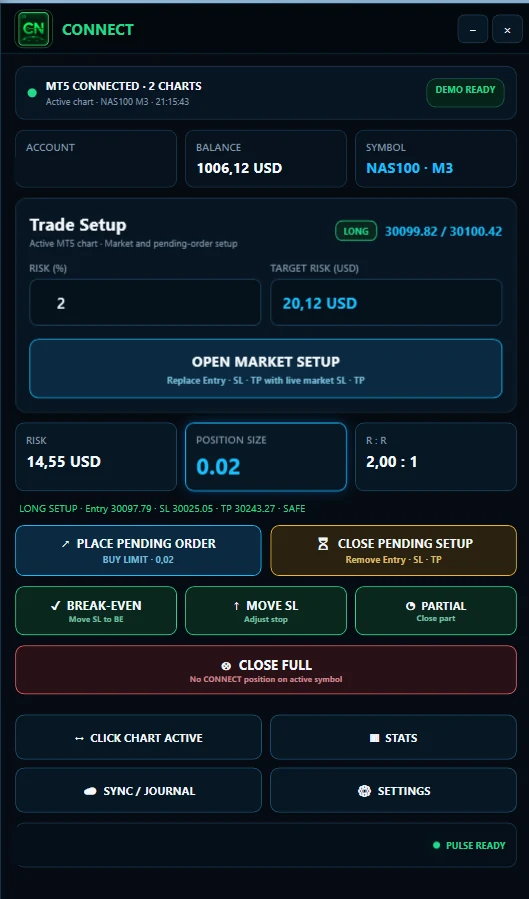
RISK BEFORE EXECUTION
An MT5 risk management tool supports the decisions that should be made before an order is sent. It helps translate a chosen monetary risk or account percentage into a position size, then keeps Entry, Stop Loss and Take Profit visible as one planned setup.
The tool does not replace a strategy, decide whether a setup is valid or guarantee that an order will be profitable. Its purpose is narrower: make the trader's predefined risk easier to calculate, check and apply consistently in a manual MetaTrader 5 workflow.
Define the amount or percentage you are prepared to lose if the planned Stop Loss is reached.
Match the volume to the selected risk, the stop distance and the relevant symbol specification.
Review Entry, Stop Loss, Take Profit and the planned risk-reward relationship together.
Approve each supported action manually and document what happened after the trade.
VARIABLE DISTANCE, VARIABLE EXPOSURE
The same lot size does not create the same monetary risk when the distance to the Stop Loss changes.
Imagine two trades in the same instrument. Both use 0.50 lot, but one has a 20-point stop and the other a 60-point stop. If the value per point is otherwise identical, the second trade exposes three times as much money before the stop is reached.
A consistent process therefore starts with the trader's chosen risk and the actual stop distance. The position size is the variable that connects them. BTI does not prescribe a universal percentage: the trader defines the risk appropriate to their own plan and circumstances.
With a fixed volume, the shorter stop creates the lower monetary exposure in this simplified comparison.
The same volume across three times the distance creates three times the monetary exposure.
Recalculate the position size so the planned loss at the stop remains aligned with the chosen risk.
A SIX-STEP PRE-TRADE CHECK
Execution comes after the risk, levels and valid volume have been reviewed.
Start with the relevant account balance or capital figure used by your own risk plan.
Set the monetary amount or percentage you are willing to risk on this specific trade.
Use your strategy to establish the intended entry and the level that invalidates the setup.
Convert risk and stop distance into a position size that respects symbol volume rules.
Compare the planned target distance with the risk before committing the order.
Confirm the complete setup, then trigger the supported action manually.
NORMALIZE THE OUTCOME
1R is the initial planned risk of one trade. If a trader plans to risk 100 USD, that 100 USD equals 1R for that trade. A full loss of the planned amount is –1R. A 200 USD profit is +2R, while a 50 USD loss is –0.5R.
R makes outcomes comparable even when account size, market or monetary risk changes. It does not make the result good or bad by itself and does not guarantee profitability.
R-Multiple describes the realized result relative to the initial risk. Risk-Reward Ratio is different: it compares planned risk with the planned target before the trade. One measures the completed outcome; the other describes the intended setup.
RISK, DISTANCE AND VOLUME
Position sizing connects the amount at risk with the distance between Entry and Stop Loss. A wider stop generally requires a smaller volume for the same planned monetary risk; a tighter stop permits a larger calculated volume, subject to the symbol rules.
Those rules are not universal. Brokers and symbols can use different tick sizes, tick values, pip conventions, contract sizes, minimum volumes and volume steps. A web calculator is a useful reference, but execution must respect the specifications of the actual MT5 account and symbol.
CHECK THE WHOLE SETUP
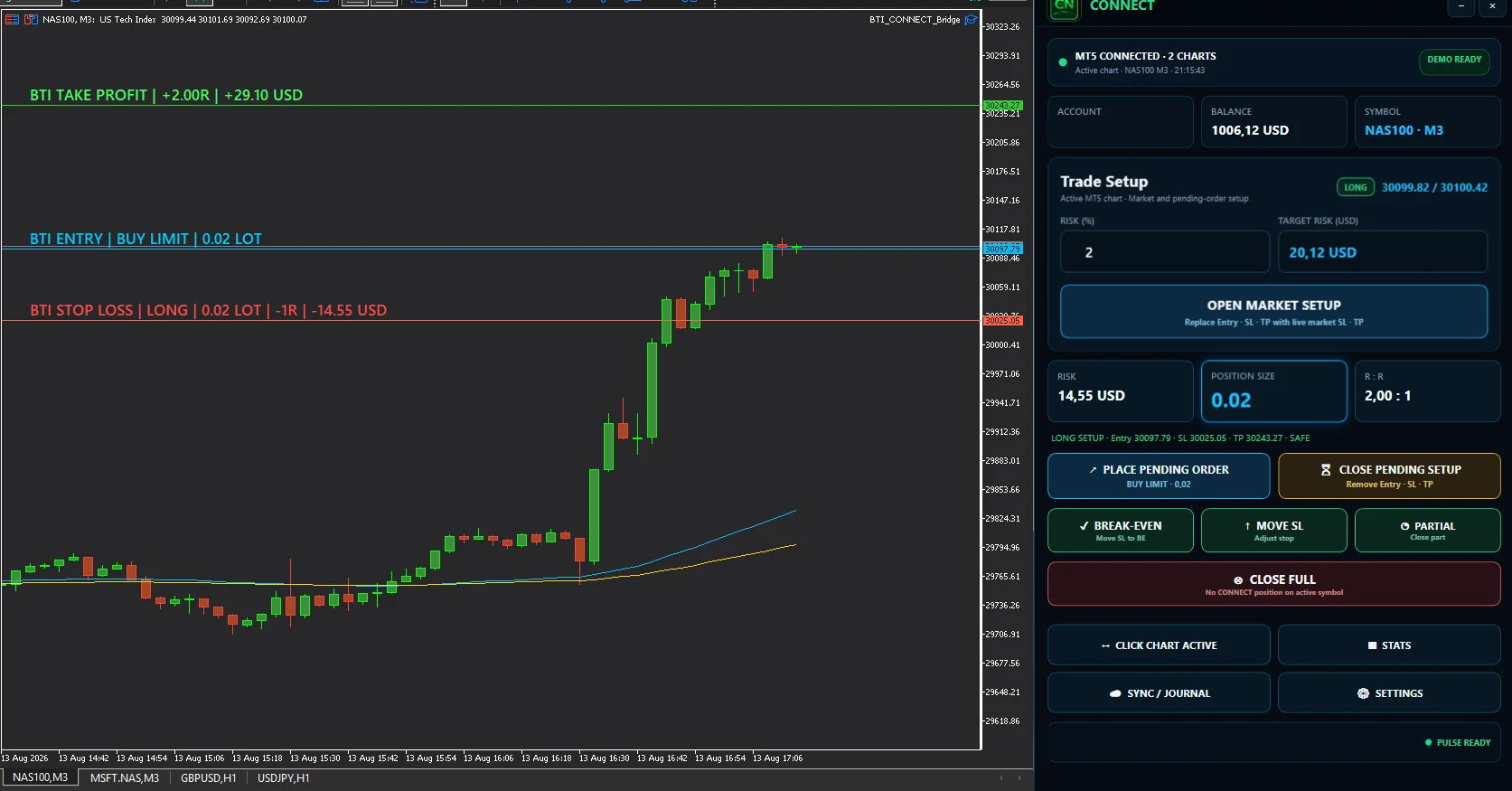
A Market Setup uses the current market context; a Pending Setup prepares an order for a planned future level. In either case, Entry, Stop Loss and Take Profit should be reviewed together before the order is submitted.
The planned risk-reward ratio can help compare the stop distance with the intended target distance, but it is not a signal or a recommendation. The trader remains responsible for the strategy, direction, levels and decision to trade.
KEEP THE PLAN VISIBLE
After entry, management decisions can change the final exposure. CONNECT keeps supported actions together so the trader can compare the next action with the original setup.
BTI CONNECT supports user-controlled manual trading actions. It does not select trades or operate as an autonomous trading bot.
Prepare supported setup types while keeping planned levels and risk visible.
Adjust the stop through a deliberate user action and reassess the remaining exposure.
Use the supported break-even control when it matches your manual management decision.
Reduce part of a supported position while retaining control of the remainder.
Close the supported position through an explicit user-controlled action.
CHOOSE THE RIGHT LEVEL OF SUPPORT
These resources serve different parts of the same manual workflow. The free calculator is a quick reference, the Trade Manager guide explains execution-side controls, and CONNECT is the Windows application used with the supported MT5 bridge.
| Option | Best for | What it does | Execution |
|---|---|---|---|
| Free Web Calculator | Quick reference | No sign-up; calculates from entered or supplied reference values. | No order execution |
| MT5 Trade Manager | Planning and management education | Explains the manual order, stop and position-management workflow. | Detail guide |
| BTI CONNECT | Supported Windows and MT5 workflow | Uses account and symbol context for risk calculation, position sizing, setup and supported manual management actions. | User-controlled via the existing bridge |
CONNECT availability and functions depend on the supported platform, MT5 environment, broker and symbol configuration, and the current product version. It is not presented as compatible with every broker, platform or symbol.
COMPLETE THE FEEDBACK LOOP
Plan the risk with CONNECT, execute and manage the trade manually, then synchronize supported trade data with PULSE. Review the result in money, percentage and R, and add the rules, screenshots and comments that explain the decision.
A journal cannot change the completed trade. It can make the gap between the original plan and the realized action easier to inspect.
PROCESS CHECK
Most risk mistakes are not solved by adding more indicators. They are process errors that can be identified before, during or after execution.
Different stop distances can turn the same volume into very different monetary exposure.
Entering first makes it harder to calculate the intended loss and valid size in advance.
Contract, tick and volume rules can differ and directly affect the valid calculation.
Required margin and the planned loss at Stop Loss describe different parts of exposure.
The pre-trade target ratio is not the same as the R-multiple achieved after closing.
An additional position can increase total risk even when each order appears acceptable alone.
Changing the invalidation level can expand risk beyond the original plan.
A result alone does not show whether the setup, risk and management rules were followed.
FAQ
Clear answers about position sizing, R, broker specifications and manual execution.
An MT5 risk management tool helps a trader define risk, calculate position size, organize entry, stop-loss and take-profit levels, and review the setup before a manual order is placed.
No. A risk tool can support a predefined process, but it cannot prevent losses, guarantee execution quality or make a trading strategy successful.
Choose the amount or percentage you are prepared to risk, define the entry and stop-loss distance, then calculate a position size using the actual symbol specifications in your MT5 environment.
One R is the initial planned risk of a trade. If the initial planned risk is 100 USD, then 100 USD equals 1R for that trade.
Risk-reward ratio compares planned risk with a planned target before entry. R-multiple describes the realized profit or loss relative to the initial planned risk after the outcome is known.
Yes. It can calculate a position size from the selected risk and stop distance when the relevant tick, pip, contract, minimum-volume and volume-step specifications are available.
No. BTI CONNECT supports user-controlled manual trading actions. It does not select trades or operate as an autonomous trading bot.
Yes. Tick value, pip value, contract size, minimum volume and volume step can differ between brokers, accounts and symbols, which can change the valid position size.
Yes. The free web calculator works without sign-up or a CONNECT installation and provides a reference calculation from the inputs and supported specifications.
PULSE can present trade outcomes in R so results can be reviewed relative to each trade's initial planned risk, alongside money, percentage and journal context.
A CONTROLLED MANUAL WORKFLOW
Use the free reference calculator, explore the supported CONNECT workflow and carry completed trades into PULSE for structured review.