FREE MT5 TRADING TOOL

MT5 Position Size Calculator

Know your lot size before you place the trade.

Choose an instrument, enter your account balance, risk and stop-loss distance. BTI calculates a risk-based position size in seconds.

  • Free to use
  • No sign-up
  • Built for manual MT5 traders

QUICK MODE

Calculate your lot size

Reference tool · Calculates locally in your browser · No data is stored

Risk
%
pips
Loading reference presets...

This calculator is an educational reference. Verify the symbol's contract size, tick or pip value, minimum volume and volume step in your own MT5 environment before placing a trade.

WANT THE EXACT MT5 WORKFLOW?

Skip the manual calculator with BTI CONNECT.

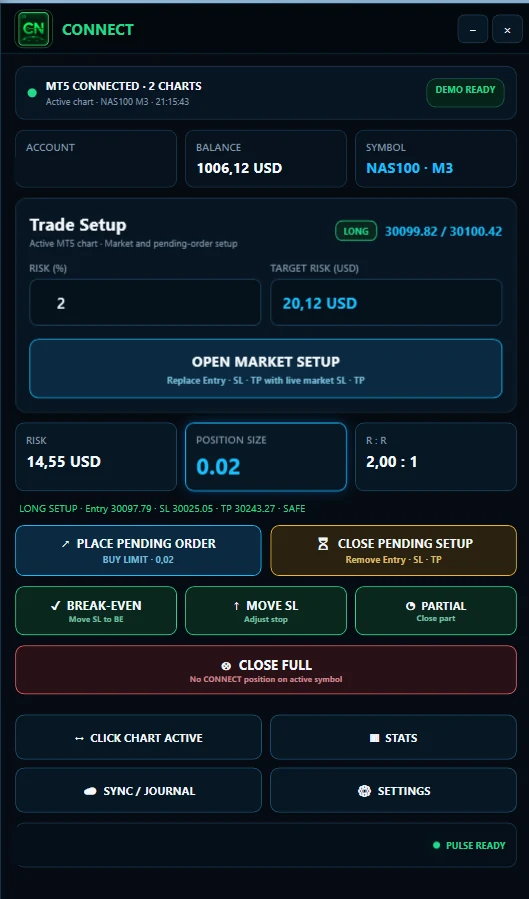
This free calculator uses the instrument information available to the web tool. BTI CONNECT brings account data, symbol information, risk and position sizing together before you execute the trade.

Define the risk. CONNECT handles the sizing inside the workflow.

CONNECT supports user-controlled manual trading actions. It is not an autonomous trading bot.
BTI CONNECT showing risk-based position sizing for a manual MT5 trade

POSITION SIZING BASICS

How does position sizing work?

Position size connects the amount you are willing to risk with the distance to your stop loss. A wider stop requires a smaller position for the same monetary risk. A tighter stop allows a larger position while keeping the defined risk unchanged.

SELECTED RISK÷LOSS AT STOP FOR 1.00 LOT=POSITION SIZE
01

What does 1.00, 0.10 and 0.01 lot mean?

1.00 lot is a standard or full lot according to the instrument specification. 0.10 lot is one tenth of 1.00 lot, while 0.01 lot is one hundredth. A volume of 0.001 lot may be supported when the symbol's allowed minimum and volume step permit it.

02

Why does MT5 lot size sometimes jump from 0.10 to 0.20?

Every tradable symbol has an allowed volume step. Some symbols support steps of 0.01, others 0.10, 0.001 or another value. A valid position size must match that step. This calculator always rounds down to avoid exceeding the selected target risk.

03

Why can the same symbol have a different lot size at another broker?

MT5 is the trading platform, but the broker defines the symbol specification. Contract size, tick value, minimum volume and volume step can differ between trading environments. That is why a web calculator can provide a useful reference while BTI CONNECT can work with the actual MT5 environment.

FAQ

MT5 lot size questions

Clear answers about reference calculations, volume steps and manual execution.

What is an MT5 position size calculator?

It calculates a trade volume based on the amount you choose to risk and the distance to your stop loss.

What does lot size mean in MT5?

Lot size is the trading volume used for an order. The exact monetary exposure of 1.00 lot depends on the symbol specification.

What is a volume step?

Volume step is the smallest permitted increment between tradable lot sizes. For example, a step of 0.01 allows 0.01, 0.02, 0.03 and so on.

Can MT5 use 0.001 lot?

Only if the broker's symbol specification supports that minimum volume and volume step.

Why does my broker show a different result?

Contract specifications can differ between brokers and symbols. Use the relevant broker specifications for an exact comparison.

Does this calculator place a trade?

No. The calculator only estimates a position size.

Does BTI CONNECT trade automatically?

No. CONNECT is designed for user-controlled manual trading actions.

What is the difference between this calculator and CONNECT?

The web calculator is a quick reference tool. CONNECT is designed to perform risk and position sizing inside the actual MT5 trading workflow.

FROM CALCULATION TO EXECUTION

Calculate it here. Control it in CONNECT. Review it in PULSE.